Set up fraud screening on your products so suspicious orders are held for review before codes are delivered. Keysender checks each order at delivery time and holds anything that looks risky, so you can review it in the panel before stock goes out. Screening runs only when the order is delivered through the Access Page.
Make sure you have:
Open the product details page for the product you want to protect.
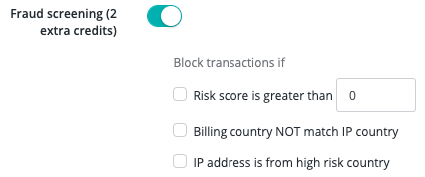
Set a risk score threshold based on how much fraud risk you accept for that product.
Enable billing country and IP matching to hold orders where the billing country does not match the IP country.
Enable high-risk country blocking to hold orders from countries Keysender has flagged as high-risk.
Click Save.
Open Settings in Keysender, then open Security.
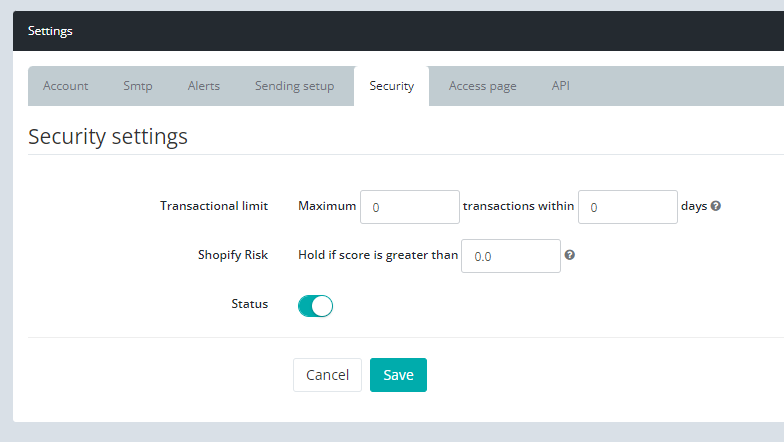
Set the Shopify risk score threshold. Orders scored above the threshold are held for review.
Set the transactional limit to cap how many orders a single customer email can place within a set number of days.
Click Save.
Orders that pass any of your thresholds are held for review instead of being fulfilled automatically. Review your fraud settings as new patterns appear and adjust the thresholds when needed.
Submit a claim so Keysender Support can review it.
Fraud screening only runs when the order is delivered through the Access Page, so the Access Page must be your delivery method. Your distribution messages need to use the [STATUS] variable, which links the buyer to the Access Page where screening takes place before codes are delivered.
When you enable billing country and IP matching on a product, Keysender holds any order where the billing country does not match the IP country. You can also set a risk score threshold and turn on high-risk country blocking to hold orders from flagged countries.
Orders that pass any of your thresholds are held for review instead of being fulfilled automatically. Review your fraud settings as new patterns appear and adjust the thresholds when needed. For Shopify, you can also set a risk score threshold and a transactional limit.
