Reading this in another language? Use your browser's built-in translate option. Button and field names stay in English on purpose, to match what you see in Keysender.
Set up fraud screening on your products so suspicious orders are held for review before codes are delivered. Keysender checks each order at delivery time and holds anything that looks risky, so you can review it in the panel before stock goes out. Screening runs only when the order is delivered through the Access Page.
TL;DR
Make sure you have:
[STATUS] variable.Open the product's details page and go to its Setup tab.
Check Fraud screening. This costs an extra credit per order it screens. Checking it reveals the conditions it blocks on.
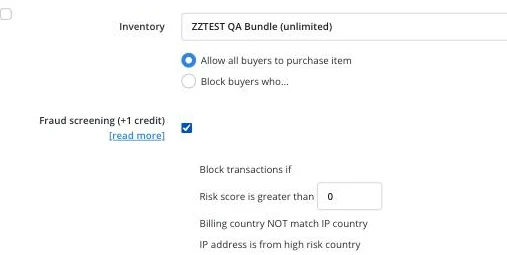
Set Risk score is greater than to the threshold you want. Orders scoring above it are held.
Once fraud screening is on, billing country NOT match IP country and IP address is from high risk country are both included automatically; there is no separate switch for either.
Click Save changes.
Open Account, then Settings, then Security in Keysender.
Under Transactional security, set Allow for maximum transactions within a number of days, per customer. This caps how many orders one customer email can place in that window.
Set Shopify risk score to hold transactions when Shopify's own risk level (Low, Medium or High) is at or above your chosen level.
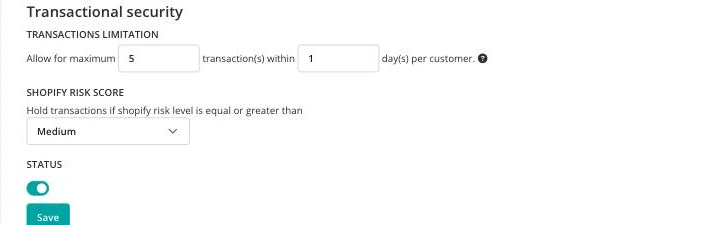
Turn on Status, then click Save.
Orders that pass any of your thresholds are held for review instead of being fulfilled automatically, visible under managing notifications for held orders. Review your fraud settings as new patterns appear and adjust the thresholds when needed.
| Symptom | Cause | Action |
|---|---|---|
| Fraud screening never holds anything | The Access Page is not the delivery method, or distribution messages do not use [STATUS] |
Screening only runs through Access Page deliveries; confirm the template includes [STATUS] |
| Shopify transactional security has no effect | Status under Transactional security is off | Turn on Status and click Save |
| An order was held for a reason not shown as a separate toggle | Billing/IP mismatch and high-risk country are always included once Fraud screening is checked | Uncheck Fraud screening if you only want the risk score condition; there is no way to disable just one of the three |
Submit a claim so Keysender Support can review it.
Fraud screening only runs when the order is delivered through the Access Page, so the Access Page must be your delivery method. Your distribution messages need to use the [STATUS] variable, which links the buyer to the Access Page where screening takes place before codes are delivered.
When you enable billing country and IP matching on a product, Keysender holds any order where the billing country does not match the IP country. You can also set a risk score threshold and turn on high-risk country blocking to hold orders from flagged countries.
Orders that pass any of your thresholds are held for review instead of being fulfilled automatically. Review your fraud settings as new patterns appear and adjust the thresholds when needed. For Shopify, you can also set a risk score threshold and a transactional limit.
