Reading this in another language? Use your browser's built-in translate option. Button and field names stay in English on purpose, to match what you see in Keysender.
Turn on New Held Order alerts to know the moment an order is held, instead of hearing it from a buyer. A held order is not lost; it is waiting for you or stock. Keysender emails you the moment one happens, so you can review it first - most holds come from fraud screening.
TL;DR
Make sure you have:
Open Account, then Settings in Keysender.
Click the Alerts tab.
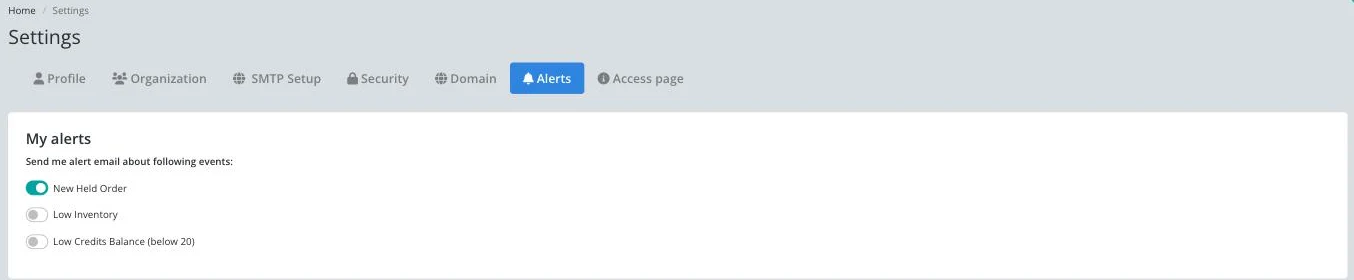
Turn on New Held Order.
The same screen also has Low Inventory and Low Credits Balance (below 20) alerts, if you want those too.
When an order is held, for fraud, low stock, a block list match, or any other reason, you receive an email at your account address so you can review it in the panel.
| Symptom | Cause | Action |
|---|---|---|
| No alert email arrived for a held order | New Held Order is off, or the alert landed in spam | Turn the toggle on under Alerts, and check your spam folder |
| Alerts go to the wrong address | The account email is out of date | Update it under Account, Settings, Profile |
| The toggle looks on but no alerts arrive at all | A mail provider is blocking Keysender's alert emails | Check your provider's spam or blocked-senders list, and add Keysender as a safe sender |
Submit a claim so Keysender Support can review it.
In Account then Sending Setup you choose which conditions trigger a notification. The options include low codes, block list, and buyer limit. When an order meets one of the conditions you selected, the customer receives your configured message by email or inbox.
Inbox messages apply to eBay and Mercado Libre orders. When you set up held-order notifications, pick an inbox template for those channels and an email template for the rest, then click Save so the right message goes out for each held order.
You need access to your Keysender vendor account and at least one email or inbox template created in Templates. The dropdowns in Sending Setup let you pick from your existing templates, so create the template you want to send before you configure the held-order conditions.
