Import orders that Keysender did not capture automatically. eBay needs a manual sync. Most other connected channels sync in the background. A sync gap usually shows up as a paid order on the channel with no matching transaction in Keysender; running a sync pulls it in and delivers the code, so the buyer is not left waiting.
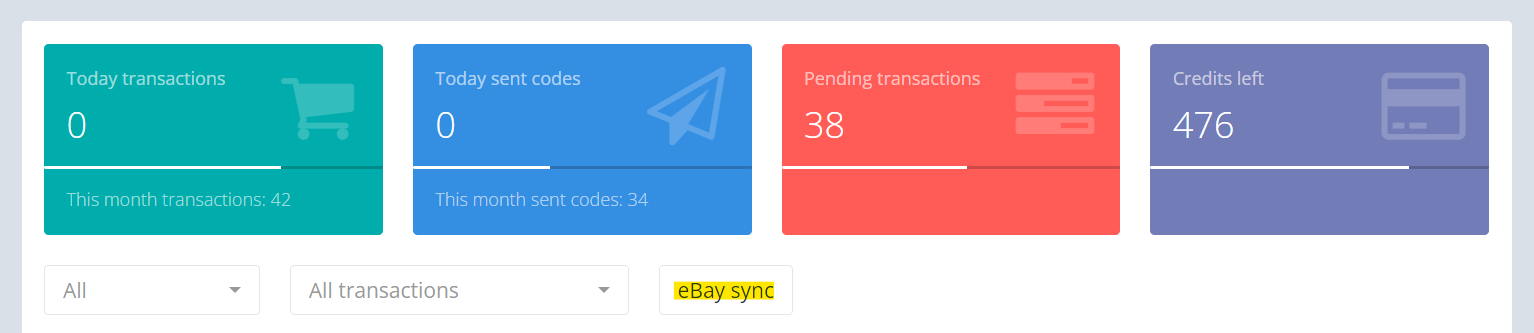
Open your transaction summary page in Keysender.
Click eBay Sync.
Enter the number of days you want to sync.
Click Apply.
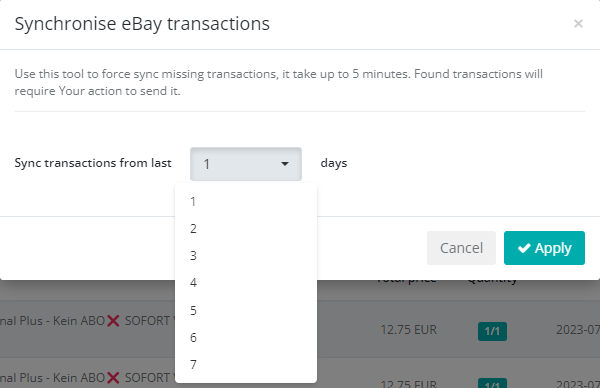
Keysender reviews past eBay orders from that period and imports any missed transactions.
Most other connected channels sync in the background, so no manual sync is needed. Confirm the channel is connected and product monitoring is active.
Missed orders appear in your transactions list after the sync completes.
Confirm the channel is connected and product monitoring is active. If orders are still missing, submit a claim so Keysender Support can review it. Include the affected order numbers and order dates.
eBay needs a manual sync to import orders Keysender did not capture automatically. Most other connected channels sync in the background, so no manual sync is needed. Confirm the channel is connected and product monitoring is active.
Open your transaction summary page in Keysender, click eBay Sync, enter the number of days you want to sync, and click Apply. Keysender reviews past eBay orders from that period and imports any missed transactions into your transactions list.
Confirm the channel is connected and product monitoring is active. If orders are still missing, submit a claim so Keysender Support can review it, and include the affected order numbers and order dates so support can trace them.
